You may also like:
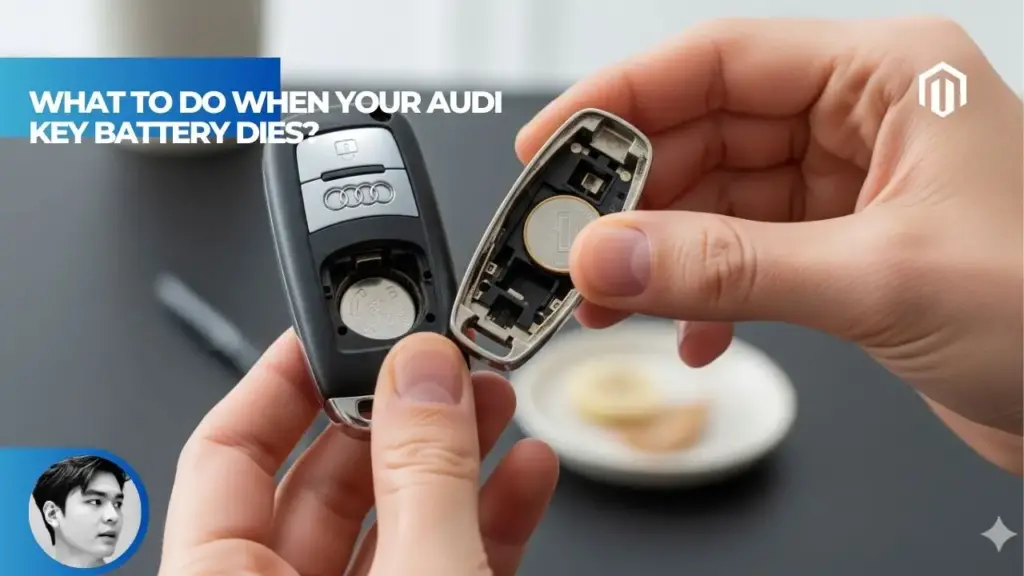
When your Audi key battery dies, use the hidden emergency key blade to manually unlock the driver’s door, then place the dead fob on the backup start location to start the vehicle[1]. The backup start location varies by model—typically in a cup holder or on the center console. Even with a completely dead battery, the car’s immobilizer can still read the fob’s RFID chip when placed directly on this designated spot[2]. Replacing the CR2032 battery costs $3–$8 and takes less than 5 minutes without special tools[3].
Step 1: Extract the Emergency Key
Every Audi key fob contains a hidden mechanical key for situations exactly like this.
How to Remove the Emergency Key
Look for two small black buttons on either side of the metal keyring end of your fob[4]. Squeeze both buttons simultaneously and pull the chrome/metal end away from the fob body. The mechanical key blade slides out.
Older key fobs may have a single release button or a different mechanism. Check your owner’s manual if the dual-button method doesn’t apply to your model. Once extracted, this key works exactly like a traditional car key for door access.
Step 2: Unlock the Driver’s Door Manually
The manual unlock process depends on whether your Audi has a visible keyhole or a hidden one.
Models with Visible Keyholes
If you can see a keyhole on the rear of the driver’s door handle, simply insert the emergency key and turn[4]. The door unlocks immediately, and you’re inside.
Models with Hidden Keyholes (2020+ A3, Q3, and Others)
Many newer Audis hide the keyhole under a removable cover to maintain clean styling[2]. On these models:
- Locate the small removable panel on the door handle
- Use the emergency key blade to pry it off gently
- Insert the key into the revealed keyhole
- Turn to unlock
The A3 and Q3 from 2020 onward commonly feature this hidden keyhole design[5]. Don’t worry—you’re not damaging anything. The cover is designed to be removed.
Step 3: Start Your Audi with a Dead Key Fob
Once inside, starting the car requires placing the dead fob in a specific location so the vehicle can read its immobilizer chip.
Backup Start Locations by Model
| Audi Model | Backup Start Location |
|---|---|
| A4, A5, A6, A7, A8 | Center console near shifter or cup holder |
| Q3, Q5, Q7, Q8 | Front cup holder |
| A3 (2020+) | Front cup holder |
| e-tron, e-tron GT | Rear cup holder |
| TT, R8 | Dashboard slot or console |
Look for a small key symbol with radiating lines[1][6]
How to Start the Car
Drop the key fob into the designated cup holder or place it on the marked spot[5]. Press the brake pedal firmly—some models require harder pedal pressure than usual to engage the backup start system[1]. Then push the start/stop button as normal.
The vehicle recognizes the fob even with a dead battery because it reads the immobilizer chip via RFID when in close proximity[2]. If it doesn’t start on the first try, reposition the fob slightly and press the brake harder.
Older Audi Models (Pre-2019)
Earlier Audis may have a slot in the dashboard or steering column where you insert the entire key fob[4]. Push the fob into the slot, press the brake, and start as normal. The car detects the fob even without battery power.
Step 4: Replace the Dead Battery
Once you’ve gotten your car started, replace the battery before your next outing.
What Battery Do Audi Key Fobs Use?
Most Audi key fobs from 2008 to present use a CR2032 lithium coin cell battery[3][7]. This is one of the most common battery types, available at any pharmacy, grocery store, or electronics retailer for $3–$8.
Tools Needed
- Small flathead screwdriver (optional—fingernail works too)
- New CR2032 battery[3]
Battery Replacement Steps
- Step 1: Remove the emergency key blade using the release buttons.
- Step 2: Locate the battery tray. On most Audi fobs, it’s accessed by pressing in two small catches on the plastic body[7]. The tray slides out.
- Step 3: Note the battery orientation (positive side facing up or down) before removing the old battery.
- Step 4: Insert the new CR2032 battery with correct polarity.
- Step 5: Slide the tray back into the fob until it clicks.
- Step 6: Replace the emergency key blade.
No reprogramming is required after battery replacement[3]. Test the fob immediately—lock/unlock should work right away.
Video Guides by Model
The exact technique varies slightly between fob generations. For 2018–2025 models, the battery tray slides out from the bottom after releasing catches[7]. Earlier fobs may require prying apart the casing. When in doubt, search YouTube for your specific model year.
Signs Your Audi Key Battery Is Dying
Don’t wait until you’re stranded. Watch for these warning signs:
- Reduced range – You need to get closer to the car before it responds
- Delayed response – Noticeable lag when pressing lock/unlock
- Intermittent failures – Sometimes works, sometimes doesn’t
- Dashboard warning – Some models display “Key Battery Low”
- Blinking issues – Red light blinks but car doesn’t respond
Most Audi key batteries last 2–4 years under normal use[1]. Replace proactively when you notice range decreasing rather than waiting for complete failure.
What If the Emergency Key Doesn’t Work?
In rare cases, the emergency key may not function properly.
Door Doesn’t Unlock
Check that you’re using the correct door—only the driver’s door has a manual keyhole on most models. Verify you’re turning the key in the correct direction. If the lock mechanism is frozen (common in cold climates), try warming the key or applying lock de-icer.
Can’t Find the Keyhole
On some models, the keyhole cap can be stubborn. Use the emergency key blade to carefully pry around the edges of the handle cover. It’s designed to pop off without damage.
Key Fob Was Damaged
If your Audi key went through the washing machine, water damage may prevent proper function even with a new battery. Let it dry completely for 24–48 hours before replacing the battery. If problems persist, you’ll need a key fob replacement.
Will the Alarm Go Off?
A common concern: will using the emergency key trigger the alarm?
On most Audi models, unlocking with the mechanical key does not set off the alarm, though the security system may “chirp” briefly[1]. Starting the car with the key fob in the backup location confirms vehicle authorization and disarms the system completely.
If the alarm does sound briefly, don’t panic. Starting the engine with the valid key fob present will silence it immediately.
Preventing Future Dead Battery Emergencies
A few habits extend key battery life and prevent stranded situations:
- Keep spare batteries – Store CR2032 batteries in your glovebox or wallet
- Carry the emergency key – Some owners keep it on a separate keyring at home (not recommended for security, but useful in emergencies)
- Replace batteries proactively – Don’t wait for complete failure
- Check both fobs – If you have two keys, both batteries likely need replacement around the same time
Your Audi’s tracking features won’t help if you’re locked out, but keeping your key in good working order ensures you’re never stranded.
Key Takeaways
- When your Audi key battery dies, extract the hidden emergency key blade by pressing the release buttons, then use it to manually unlock the driver’s door[4].
- Start the car by placing the dead fob on the designated backup start location (cup holder or console) and pressing the brake firmly while pushing the start button[1][2].
- Most Audi key fobs use CR2032 batteries costing $3–$8, and replacement takes less than 5 minutes without tools or dealer visits[3][7].
- Newer Audis (2020+ A3, Q3) may have hidden keyholes under a removable cover on the door handle—use the emergency key blade to pry it off[5].
- Watch for warning signs like reduced range or delayed response, and replace batteries proactively to avoid being stranded[1].
FAQs
Can I start my Audi if the key fob battery is completely dead?
Yes. Place the dead fob directly on the backup start location (usually in the cup holder or on the center console) so the car can read its RFID immobilizer chip[2]. Press the brake firmly and push the start button as normal.
What battery does an Audi key fob use?
How do I unlock my Audi with a dead key fob?
Where is the backup start location in my Audi?
Do I need to reprogram my Audi key after replacing the battery?
No. Simply swap the battery and the fob works immediately[3]. No dealer visit or reprogramming is required.
How long do Audi key fob batteries last?
Typically 2–4 years depending on usage[1]. Frequent use of keyless entry and remote features drains the battery faster.
References
- Autvex. (2025). What to Do When Your Audi Key Battery Dies? https://autvex.com/webstories/what-to-do-when-your-audi-key-battery-dies/
- CarInterior. (2026). Yes, You Can Start an Audi with a Dead Key Fob. https://carinterior.alibaba.com/buyingguides/how-to-start-choose-audi-key-fob-with-dead-battery
- YouTube – FixitDIY. (2023). Audi A4, A5, Q5, A6, A7, A8 Key Fob Battery Replacement. https://www.youtube.com/watch?v=h4lu9HG5Qh4
- Dashboard Symbols. (2019). Open and Start Audi Keyless Start Models with Dead Key Fob Battery. https://www.youtube.com/watch?v=65w5RFP8cK0
- Dashboard Symbols. (2024). Open and Start Audi A3 and Q3 Models with Dead Key Fob. https://www.youtube.com/watch?v=8DlhP5RN92w
- Program Your Remote. (2023). 2018-2020 Audi Q5 – How to Unlock, Open & Start With Dead Remote Key Fob Battery. https://www.youtube.com/watch?v=zFfrGREdVLg
- YouTube. (2025). 2018-2025 Audi Key Fob Battery Replacement – EASY DIY. https://www.youtube.com/watch?v=mfsic_TpnSk

I am a senior automotive analyst at Autvex. Expert vehicle evaluations, in-depth reviews, and objective analysis helping readers make informed automotive decisions with years of industry experience.